Quadtree based intersections and collisions of moving objects
This article will show you how to implement exact collision detection between two axis-aligned rectangles or binary quadtrees including movement! We will cover what these words mean. The code is linked below so you can adapt it as you like to your desired language or environment. The code is generally kept as simple as possible to be accessible to a broader audience.
The method presented here will not work if the base objects are rotated, though a solution is mentioned.
A basic understanding of vectors is useful. I also have a quick summary of vector properties here if you need a refresher.
You can find the code for the demo below split up in four files:
- simple_vector.js: Simple implementations of basic vector operations used in the demo. All vectors are represented as arrays with two elements. When you see a function in the examples below starting with
v, there is a good chance it is a vector operation - grid.js: Simple grid class which holds the data of the pixel objects. Also defines constants for the values representing obstacles (
OBSTACLE) and free space (FREESPACE). - collisions.js: Contains the code for generating the data structures and the corresponding intersections and collisions. This is where you find the content of this article
- main.js: Not the most important script, this is just the slightly disorderly setup to run the demo you see below and use the functions for collision.
We will start with the simpler case and then build on that. First, let's see the result!
Demo
Here you can see the result of all that follows in action. You can draw your own pixel objects below and switch modes, for example replacing the collision object or both with rectangles. You can also drag around the object centers in the top canvas.
Keyboard shortcuts
Axis-aligned bounding box (AABB) intersections
We start with a special rectangle: The rectangle's sides are parallel to the normal coordinate axes. One pair is parallel to the x axis and the other to the y axis. We use this rectangle to encapsulate an object or part of an object, for example the player character in a game just a part of them, like the feet, or individual pixels. That way we encapsulate or put a bound on our object. This gives rise to the very common name Axis-aligned bounding box or AABB for short.
NOTE: It is also possible to have a rectangle, that is not axis-aligned. In this case we call it an Oriented bounding box or OBB for short. What we will be discussing here can also be done with OBBs, but the formulas become more complicated. And if you already have a pixel based game, chances are that if you don't use general collision shapes you either want to test individual pixels of static things like the environment or define some collision box for dynamic ones. So we won't go into more detail here.
There are a few ways to parameterize an AABB and different representations can be used for optimization in specific use cases. They are all equally valid though.
- (we use this) Minimum and maximum extents
- Minimum and size (width and height)
- Center and half size
Our simple AABB will be defined by its minimum and maximum but also compute the other values, first as a showcase second because the values come in handy at different parts. Let us call those points and . The coordinates will be written in non-bold font, so
Our coordinates will start from the top left, as that is what the HTML canvas uses, but none of this relies on that and works equally well in a coordinate system with the origin in the bottom left.
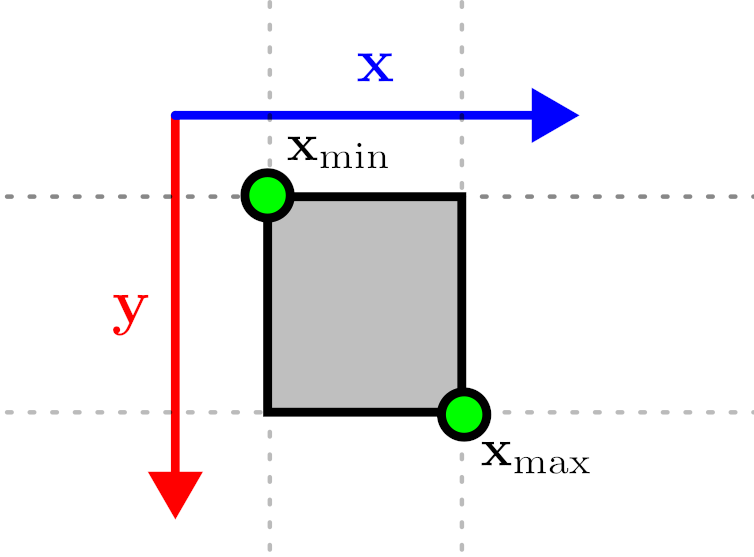
In code, it looks like this:
class AABB {
    // minimum extent
    min = [0, 0];
    // maximum extent
    max = [0, 0];
    // total size = max - min
    delta = [0, 0];
    // center of the AABB = (max + min) * 0.5
    center = [0, 0];
    // half size of the AABB = delta * 0.5
    half = [0, 0];

    constructor(min, max) {
        this.min = min;
        this.max = max;
        this.delta = vsub(max, min);
        this.half = vscale(this.delta, 0.5);
        this.center = vadd(min, this.half);
    }
}
We will start with the intersection of two AABBs. This tells us whether the two objects overlap, that is collide. Let's just call them A and B.
NOTE: It is also possible to find out where they overlap/collide, but as our plan is to deal in pixels, we only care about if they do, as the pixels are what we are interested in here.
For AABBs, this test is luckily very simple. We check, if we can find any axis where they do not overlap and there are only four possible configurations for that (the reason is this wonderful theorem):
- The minimum x coordinate of A is larger than the maximum x coordinate of B
- The minimum x coordinate of B is larger than the maximum x coordinate of A
- The minimum y coordinate of A is larger than the maximum y coordinate of B
- The minimum y coordinate of B is larger than the maximum y coordinate of A
If 1. or 2. hold, we can place a separating plane parallel to the y axis between both bonds, and for 3. and 4. one parallel to the x axis.
One important aspect of these tests is how to deal with touching objects, which will happen easily with pixels! In our case, it makes sense, that we don't consider touching pixels to be intersecting. Thus in 1.-4. we must use greater than equal () instead of just greater than ().
We also want to be able to move objects arounds. There are many ways to do this, but here we will use the following convention: The first object A is always considered to be at the origin and the second object B is positioned relative to that. Let's say we have the origins and . We can then accomplish that by adding to the minimum and maximum points of the bounds for object B.
Here is the code for the intersection.
// computes the intersection of AABBs A and B
// B's origin is moved by offsetB relative to A
function intersectAABB(a, b, offsetB = [0, 0]) {
    // these are the four conditions listed above
    // reordered 2. and 4. to have the b-terms on the righ
    if (a.min[0] >= b.max[0] + offsetB[0] ||
        a.max[0] <= b.min[0] + offsetB[0] ||
        a.min[1] >= b.max[1] + offsetB[1] ||
        a.max[1] <= b.min[1] + offsetB[1]
    ) {
        return false;
    }

    return true;
}
Now that we have this basic primitive, we can continue to a full pixel image.
Pixel image quadtrees
If we just wanted to check single pixels against each other, we don't actually need the previous section. We could just iterate over all pixels of each object (or their overlapping area) and check for each pixel, if the corresponding pixel of each object's grid is set to represent an obstacle. If so, these pixels intersect, otherwise not.
With obstacle, we just mean a "filled" pixel, something that can collide and intersect with other filled pixels.
This is simple, but has two immediate issues.
First, how do you deal with non-integer movements? While you might have pixels as graphics for your game, it might be possible to move at subpixel accuracy. If you only move in pixel units, this isn't a problem.
Second, it might get really inefficient! Imagine two objects both with only their last pixel set, so at position . If both objects move on top of each other, which would be easy, because they only collide in that last pixel, you would need to iterate over every pixel until you finally find the last position. If you had a small 32x32 pixel image, this would already be 1024 checks! Quite a lot for such a simple thing, even if this is the worst case.
A third issue is something we will talk about in the next section: How to handle movement. If one or both objects move in a frame, how would you handle this? If you have a fast moving object, it might even cover a few pixels in a frame. Would you do the above test only for the ends? Then you might miss something. Would you check in-between positions? How many? That's expensive! We will be able to handle that though!
From the example for the second issue, you might think about some optimizations. The issue was, that the intersecting pixel was at the end of our iteration. How about we iterate only half the image from the start and then iterate backwards from the end to cover the over half? This would catch the given case at half the computations!
You might see the issue though. In that case, what about pixels at the other two corners? How about we only do quarter region and then start the iterations at the corners? This would in theory be parallelizable and catch the corners earlier than before. There is still a case where a pixel is set at the last iterated pixel of the last corner. And in general you can always find configurations that perform worse, as there is No free lunch in computation. But it might give us an idea!
We could take the idea of starting at 4 quadrants. What if we beforehand went through each image quadrant and recorded, whether it contains any obstacle pixels. Then when testing, we could start by checking the quadrants against each other. If two intersecting quadrants both contain a pixel, we can then look at the actual pixels they represent to check those. But if they don't intersect or one does not contain any obstacles, we can just skip the whole region! In the previous corner obstacle example, we could immediately skip 3 of the four quadrants of each image!
And then... what if we don't stop there? What if we split each of the quadrants themselves into smaller quadrants? This would help us discard unneeded regions there as well. Of course, we would stop splitting when our regions are as big as a pixel.
We can visualize this like the following:
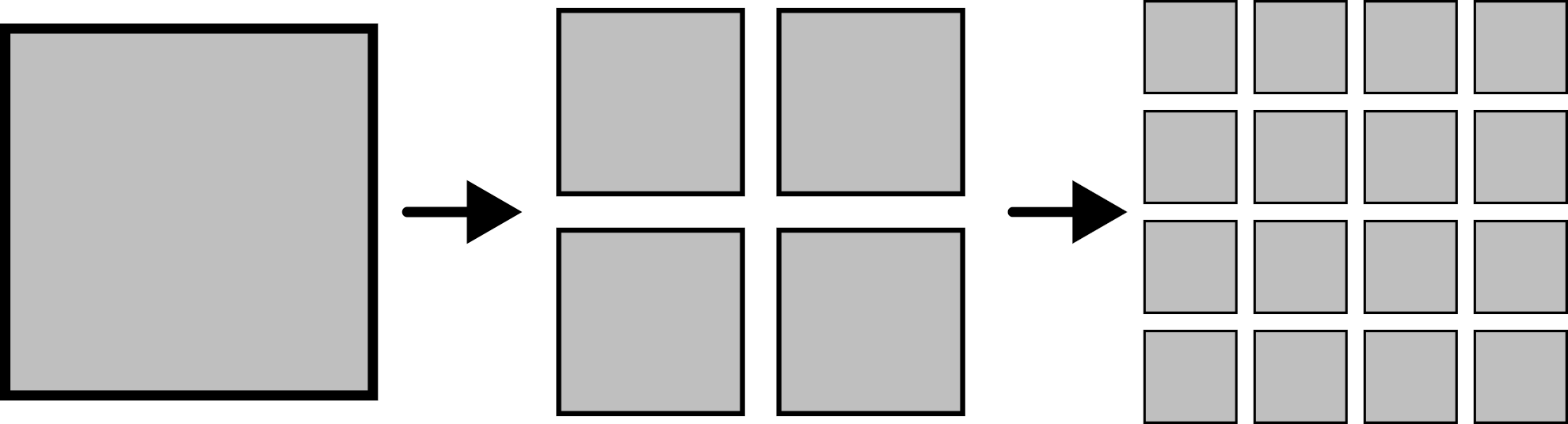
This is a data structure called a Quadtree. Tree structures are everywhere and there are many different ones used in 2D and 3D computation, in this context called spatial data structures. In 3D, the same idea, but splitting in eight octants, is called an Octree. Both of these can be considered a special case of a Bounding volume hierarchy (BVH). General BVHs are commonly encountered in computer graphics, as they adapt pretty well to more irregular scenes. If you have heard about frustum culling, this is one way to do it.
But enough of getting side-tracked. So we now have two things to accomplish: Creating this structure and then implementing the intersection.
We will follow a pretty basic procedure and setup. Our tree is represented by a node. Such a node is just an AABB describing what area it covers and an array of four children. Each of these children themselves can be a tree and thus a node! We will use the convention that null represents a tree without obstacles inside. Might not be the most elegant variant, but it's also pretty simple. A node without any children (all null) is called a leaf. In our case, these will be the pixels, as this is our smallest unit. On the other side, the node at the top, which is not a child of any other node is the root of the tree.
class QuadNode {
    // aabb of the region covered by a node
    bounds = null;
    // child nodes, null represents an empty subtree
    children = [null, null, null, null];
    // the level (how many splits have occured) for this node
    level = 0;
    // whether this is a leaf
    // could also be computed by checking if all children are null
    // this is easier to use though
    leaf = true;
}
We will do the construction recursively, as it is pretty straightforward. We could also do it iteratively, as the other operations will do.
The basic construction of a node works as follows:
Inputs: The obstacle grid and the bounds inside of the grid. We also add a level parameter. This isn't strictly needed, but makes other operations less verbose.
-
If the width or height of the bounds is 0, we return, as there is no content
-
Go through each pixel of the grid in the bounds
- If the pixel is an obstacle, create a node. Split the bounds into 4 quadrants and pass each of these to the construction method again. The results are the children of the created node. Afterwards return the node, which will end the loop
- If no obstacle was found, the loop is completed. Return null, as the region is empty
Initially, we will call this with the bounds encompassing the whole obstacle grid, level equal to 0. One thing to be careful about is the pixel area. The maximum pixel is at but its area extends one step farther. Thus the initial range is from to and we must keep this fact in mind when iterating.
In code, this looks like the following, just with a part added to indicate, that a node is a leaf.
// create quadtree from a grid
// base function to call into the recursive build
function createQuadtree(grid) {

    // initial values for the recursive call
    // size includes the full grid
    // NOTE: The maximimum is placed at (w,h),
    //   while the pixel range ends in (w-1,h-1)
    // this is because the bounding box contains the full pixel,
    //   while the indexing only considers the start
    // during iteration we must take this into account
    return createQuadNode(grid, new AABB([0, 0], [grid.w, grid.h]), 0);

}

// recursive build of a quadtree
function createQuadNode(grid, aabb, level) {

    // used to iterate over the pixels
    const [minX, minY] = aabb.min;
    const [maxX, maxY] = aabb.max;

    // used to determine if we arrived at a leaf or split too far
    const [deltaX, deltaY] = aabb.delta;

    // node has zero size -> empty -> nothing to do
    if (deltaX === 0 || deltaY === 0) {
        return null;
    }

    const { data, w } = grid;

    // go through the grid and search for obstacles
    for (let y = minY; y < maxY; y++) {
        // small optimization, we precompute this
        // we could also just call the value method of the grid
        let yOffset = y * w;
        for (let x = minX; x < maxX; x++) {

            let idx = yOffset + x;

            // if not an obstacle, we check the next pixel
            if (data[idx] !== OBSTACLE) {
                continue;
            }


            // found an obstacle
            // create node and traverse down
            const node = new QuadNode();
            node.bounds = aabb;
            node.level = level;
            node.leaf = false;

            // stop, if we are a leaf
            // a leaf is a pixel, so size is 1
            if (deltaX === 1 && deltaY == 1) {
                node.leaf = true;
                return node;
            }

            // split
            // also handles non-power-of-two sizes
            const cX = minX + Math.floor(deltaX / 2);
            const cY = minY + Math.floor(deltaY / 2);
            const c = [cX, cY];

            // the four quadrants
            node.children[0] = createQuadNode(grid, new AABB(aabb.min, c), level + 1);
            node.children[1] = createQuadNode(grid, new AABB([cX, minY], [maxX, cY]), level + 1);
            node.children[3] = createQuadNode(grid, new AABB(c, aabb.max), level + 1);
            node.children[2] = createQuadNode(grid, new AABB([minX, cY], [cX, maxY]), level + 1);

            return node;
        }
    }

    return null;
}
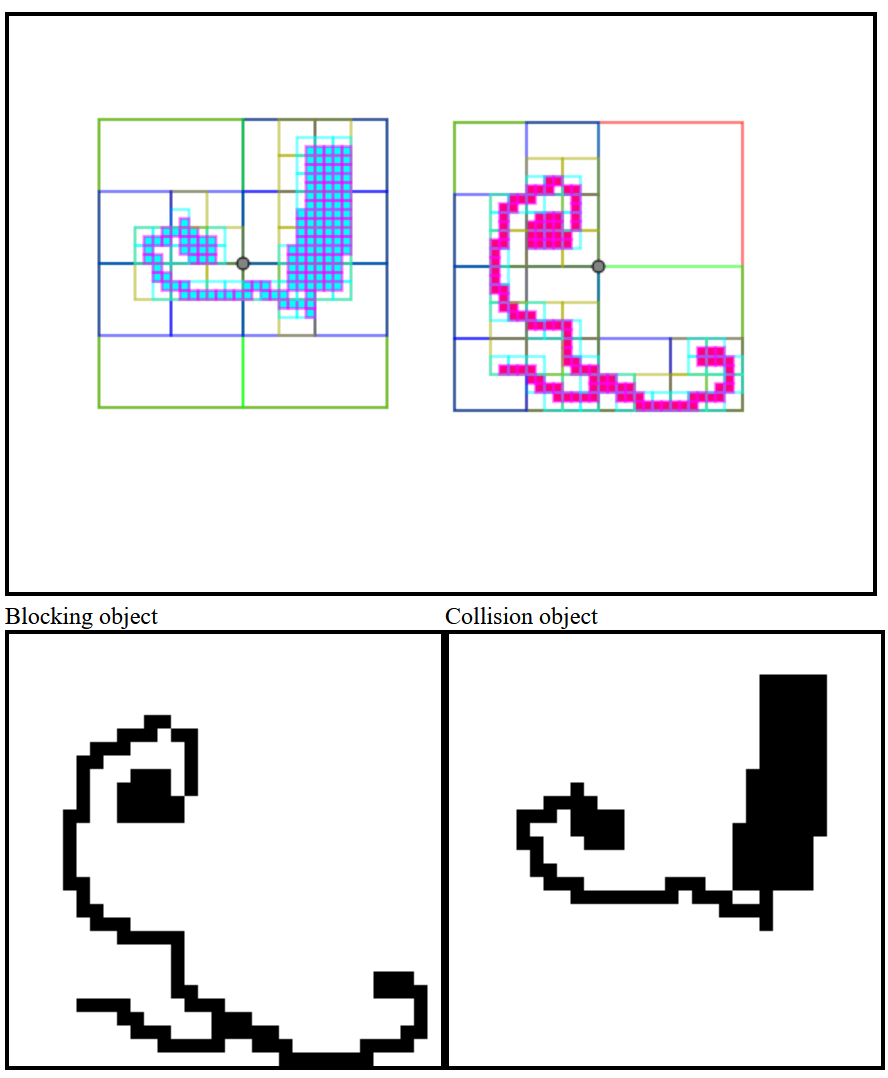
Here is an example from the demo of how this subdivision scheme works, where you can see that there are no nodes in the free regions and the structure adapts to the actual pixels!
Great! Now we can use this structure to check for intersections. The demo code calculates all possible intersections, because that is used in the visualization. Depending on the application, you might only be interested in IF a collision happens, which can be significantly faster. I will add a note after and in the code to indicate the differences, as they are pretty tiny.
So we want to find all intersections between two quadtrees. Once again, we will use object A as a reference and add an offset parameter to the function. Below is just the code, but here is what it does and it is basically what we talked about before. Basically, each node will test against the other tree.
We start with the root nodes of objects A and B put into a list as a pair. We also create an empty array for the found intersections.
At each step, we get the next pair of nodes from the top of the list. If their bounds do not intersect, nothing inside will intersect and we can skip to the next pair in line, if there is one. If they intersect, we check whether both nodes are leaf nodes. If so, we add the pair to the intersection array and continue with the next pair. Otherwise we add each pair of children of the current A node and the current B node to the list. If either of the nodes is a leaf, then we use the node itself instead of its children.
When the list of pairs is empty, we are finished and return the intersection array.
Now, if we just wanted to check IF an intersection exists, we can make a simple change. First, we don't need the intersection array anymore. Then, in our check, whether both nodes are leaf nodes, we can just return true or the collision pair instead of adding it to a list. This will exit the function as expected. When the list becomes empty and we exit the loop, no intersection was encountered and we can return false, an empty pair or whatever you see fit. That's all!
Here is the full code for the intersection, with one additional functionality, that allows us to treat all nodes after a certain level as leaf nodes. That way, we can test against coarser representations of an object!
// computes all intersections between two quadtrees
// tree A is assumed to be located at its origin
// B is moved by an offset, which is the relative
//   vector between both origins (B-A)
// the maxLevel parameters allow us to intersect with coarser levels
function intersectQuadtrees(aTree, bTree, offsetB, {
    maxLevelA = -1,
    maxLevelB = -1,
} = {}) {
    // contains all intersections at the end
    const intersections = [];

    // queue of node pairs
    const queue = [[aTree, bTree]];

    // we work until all pairs have been processed
    while (queue.length > 0) {
        // the current pair
        const [a, b] = queue.pop();

        // one of the nodes is empty, no intersections possible
        if (a === null || b === null) {
            continue;
        }

        // check if nodes are leaf nodes or treat them as one
        //   if they are larger than the max level
        // (-1 is treated as infinity)
        const aLeaf = a.leaf || (maxLevelA >= 0 && a.level >= maxLevelA);
        const bLeaf = b.leaf || (maxLevelB >= 0 && b.level >= maxLevelB);

        // no intersection -> children can't intersect either
        if (!intersectAABB(a.bounds, b.bounds, offsetB)) {
            continue;
        }

        // two leaf nodes -> intersection found
        if (aLeaf && bLeaf) {
            intersections.push([a, b]);
            continue;
        }

        // go through all children
        let nodesA = a.children;
        let nodesB = b.children;

        // if a node is a leaf, use the node itself
        //   instead of its non-existing children
        if (aLeaf) {
            nodesA = [a];
        }
        if (bLeaf) {
            nodesB = [b];
        }

        // add all child pairs
        // we don't add empty pairs, but we could,
        //   as it is handled above
        for (const ca of nodesA) {
            if (ca === null) {
                continue;
            }
            for (const cb of nodesB) {
                if (cb === null) {
                    continue;
                }
                queue.push([ca, cb]);
            }
        }
    }

    return intersections;
}
The result will look something like this:
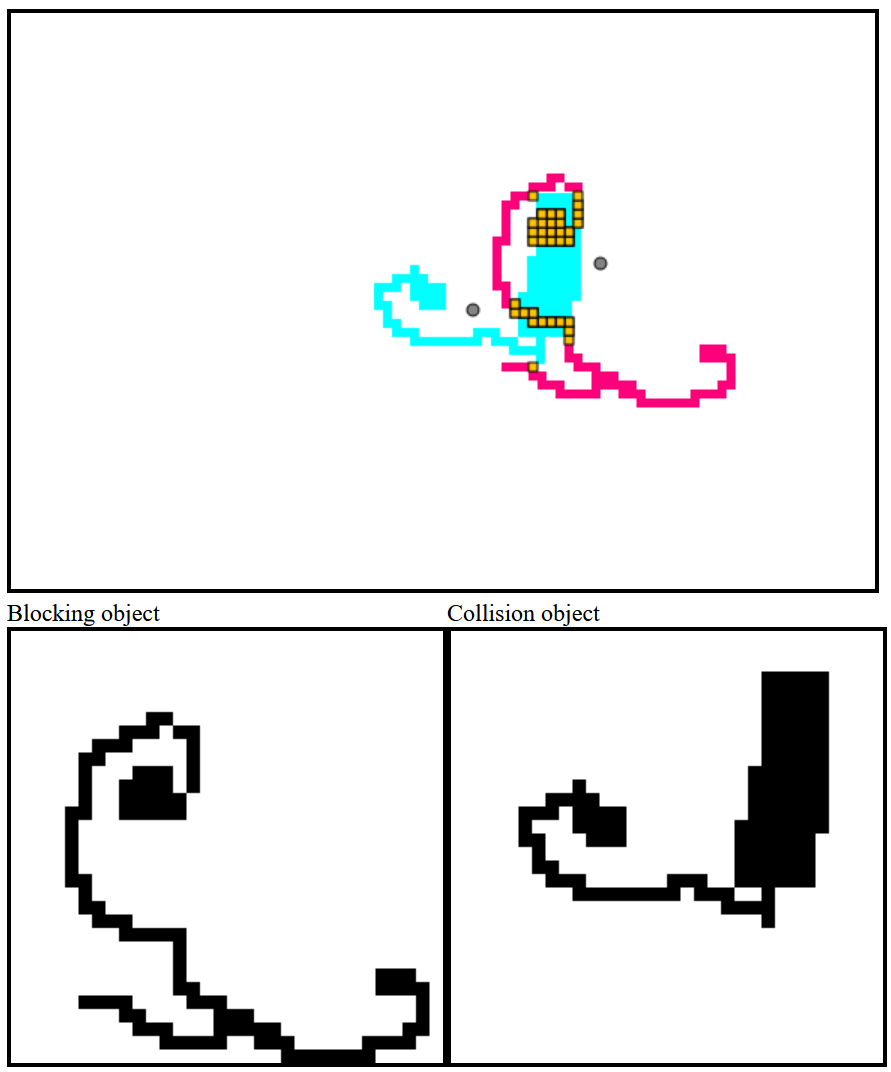
If we want to intersect an AABB with a quadtree, we can just create a new quadtree node with that AABB and set its leaf property. Then the algorithm works just as before!
Next we will extend this to moving objects. Luckily, this won't be too much change!
Intersections with moving objects
When a character moves in a game, this happens per frame. During this time objects will only move in a straight line. During this movement a moving object B could intersect with a stationary object A. We want to compute the point to which B can move until it collides with A. This is also called some variant of "sweep".
If both objects move, that isn't an issue either. As we are using A as a reference, we can just compute the relative movement as movement of B - movement of A, similar to the relative position. This is like in physics problems. When you are not accelerating, you don't feel like moving. So if you are in a car and a car next to you drives with the same speed, it kind of looks like you are both standing still (ignoring the fact that you can see your environment change, just imagine driving through thick fog).
It turns out, that this is surprisingly simple! We will only quickly cover the intuition behind it.
Imagine our AABB B trying to move by a certain amount, given by a movement vector. Now imagine B colliding with A. This means, that it was blocked by one of the sides of A. Next, think about slightly moving around the movement vector, so that the boxes still collide. B will slide around the edge it collided with.
Next up, highlight the center of the colliding B and basically trace with a line how the center moves when changing the direction. You can also move around the original position of B around A, basically cover all directions! What you will observe is, that the center will trace out another rectangle around A! (In mathematical terms which you will also find in the collision literature, this is a Minkowski sum of both shapes).
It looks something like this:
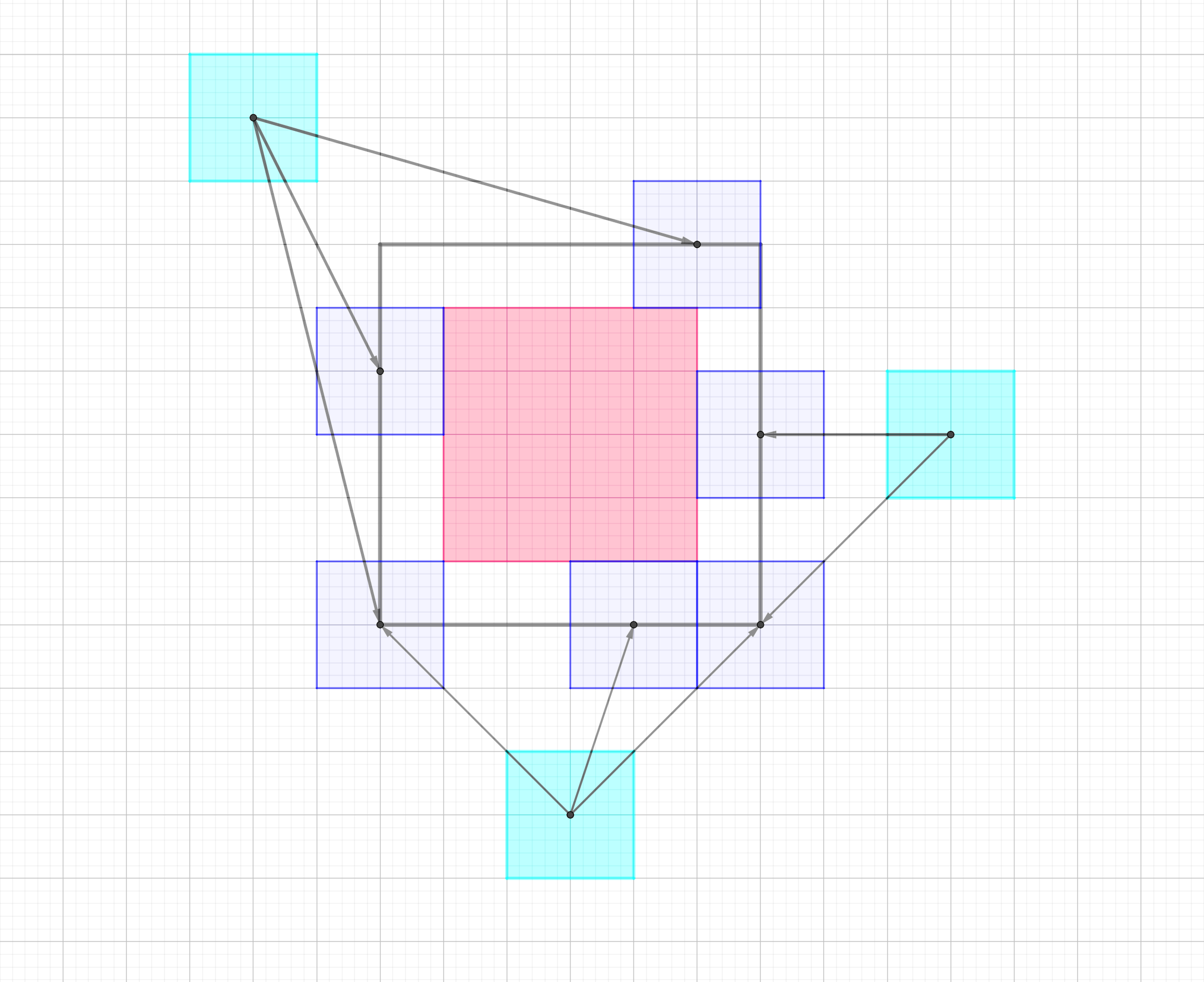
A small liberty for the purpose of visualization in the image is that the objects collide directly at the corners. This won't happen in our implementation, but it helps in creating the mental image.
The tracing out of the outer rectangle makes sense, as the collisions are just sliding around all the edges of A. This extended rectangle therefore has the the width of A plus the width of B and similar for the height! You could also say, the half size of A plus the half size of B is the half size of the extended rectangle, which might seem more natural, as we are dealing with the center of the object.
Now the problem of finding the point to which B can move until it collides with A is reduced to finding the intersection of a ray starting at the center of B and moving along the direction given by the movement vector with the extended rectangle!
Let's implement that!
First, we create a method for rectangles and then for the quadtrees.
For that, we need an algorithm for intersecting a ray with an AABB. You can find a bunch of different ones when you search for it. They are basically all based on the Slab method. Many use some very optimized versions, but sometimes you need to be careful when using them, as they might rely on properties of floating point division not used by the specific system you are using. Here is a simple version of that.
// intersects a ray with an AABB
function intersectRayAABB(bmin, bmax, rayPos, rayDir) {
    let tNear = -Infinity;
    let tFar = Infinity;

    // slab method
    for (let i = 0; i < bmin.length; i++) {

        // check axis -> must not be parallel
        if (Math.abs(rayDir[i]) > 1E-7) {
            const tlow = (bmin[i] - rayPos[i]) / rayDir[i];
            const thigh = (bmax[i] - rayPos[i]) / rayDir[i];

            const tNearI = Math.min(tlow, thigh);
            const tFarI = Math.max(tlow, thigh);

            tNear = Math.max(tNear, tNearI);
            tFar = Math.min(tFar, tFarI);
        } else {
            // if direction in axis is 0, we check
            //   instead if the ray origin in that axis lies in the bounds
            if (rayPos[i] - 1E-7 <= bmin[i] || rayPos[i] + 1E-7 >= bmax[i]) {
                return null;
            }
        }
    }

    // outside
    if (tNear > tFar) {
        return null;
    }

    // calculate various in and out values
    let t = Infinity;
    if (tNear >= 0) {
        t = tNear;
    }

    if (tFar >= 0) {
        t = Math.min(t, tFar);
    }
    if (!isFinite(t)) {
        return null;
    }
    // if the second hit occured before the origin, no actual hit happened
    const hit = tFar > 0;
    return {
        // first intersection
        tNear,
        // second intersection
        tFar,
        // first non-zero intersection
        t,
        // if a hit occured
        hit,
    };
}
This function will return null, if no intersection occurs at all and otherwise information about the hit. In the code, more is returned than you would need, but this was and can be used for debugging, so I left it there. The value of the ray will be between 0 and 1 if a collision occurred. With that in mind, we can just adjust our movement vector with as a percentage value.
The actual sweep collision will be very easy. Take in A, B, relative position and movement of B. Compute the minimum and maximum of the AABB of A enlarged by the size of B. Shoot a ray from the center of B in the direction of the movement vector against the enlarged AABB. If it hits and is less than 1, adjust the movement vector and return it.
Here is how it can look like:
// sweeps an object B by the amount moveB and
//   computes its possibly adjusted movement
//   vector if a collision with A occurs
function sweepAABB(ba, bb, offsetB, moveB) {

    // move bounds of b to offset
    const bbOrig = vadd(bb.center, offsetB);
    // pad size of a by b
    // we use the half size, as computing min max is easy:
    //   center -+ half
    const baHalfSizePadded = vadd(ba.half, bb.half);
    // adjusted min max
    const baPadMin = vsub(ba.center, baHalfSizePadded);
    const baPadMax = vadd(ba.center, baHalfSizePadded);
    // raycast with the adjusted bounds and movement vector
    const hit = intersectRayAABB(baPadMin, baPadMax, bbOrig, moveB);

    let result = {
        t: 1,
        move: moveB,
        hit: false,
    };

    if (hit !== null) {
        if (!hit.hit) {
            return result;
        }

        // a hit exist, but we need to make sure to
        //   handle the case, that the extended bounds
        //   contain the ray origin
        // if the ray origin is inside, tNear will be
        //   less than 0 and we can't move
        // generally we will take the closest
        //   intersection but clamp it to zero
        let t = Math.max(0, hit.tNear);

        // collision occured further away than we
        //   want to go, so no problem
        if (t > 1) {
            return result;
        }

        // blocked -> fill result
        result.hit = true;
        result.t = t;
        result.move = vscale(moveB, t);
    }

    return result;
}
You can see another resource about this here.
The quadtree sweep variant is actually nearly the same as before! We just replace the AABB intersection with the AABB sweep. If both nodes are leaf nodes, instead of adding them to a list, we check whether the value from the sweep test is smaller than the current one and if so replace the current one with the sweep result. We can also apply a small optimization: If the sweep produces a value larger than the current one, we don't need to go further, as the value can only get larger for child nodes. This is because the children are strictly smaller or equal, meaning that the top level collision must be the earliest one possible. We also add the colliding object pair. At the end of the processing of pairs, we return the current result containing the possibly adjusted movement vector and collision pairs!
// computes the sweep collision between two quadtrees
// tree A is assumed to be located at its origin
// B is moved by an offset, which is the relative vector
//   between both origins (B-A)
// B tries to move by the vector moveB
// the maxLevel parameters allow us to intersect with
//   coarser levels
function sweepQuadtrees(aTree, bTree, offsetB, moveB, {
    maxLevelA = -1,
    maxLevelB = -1,
} = {}) {

    // result contains movement values and the
    //   object pair of the collision
    let result = {
        sweep: {
            t: 1,
            move: moveB,
            hit: false,
        },
        objects: null,
    };

    // working queue of node pairs
    const queue = [[aTree, bTree]];

    // we work until all pairs have been processed
    while (queue.length > 0) {
        // current pair
        const [a, b] = queue.pop();

        // one of the nodes is empty,
        //   no intersections possible
        if (a === null || b === null) {
            continue;
        }

        // compute sweep between values
        const abSweep = sweepAABB(a.bounds, b.bounds, offsetB, moveB);

        // no collision found -> next pair
        if (!abSweep.hit) {
            continue;
        }

        // if the result is already further away than the current one,
        //   the children can't be closer
        if (abSweep.t > result.sweep.t) {
            continue;
        }
        // check if nodes are leaf nodes or treat
        //   them as one if they are larger than the max level
        //   (-1 is treated as infinity)
        const aLeaf = a.leaf || (maxLevelA >= 0 && a.level >= maxLevelA);
        const bLeaf = b.leaf || (maxLevelB >= 0 && b.level >= maxLevelB);

        // both leafs
        if (aLeaf && bLeaf) {
            // if the hit is before the one we already
            //   found -> replace
            if (abSweep.hit) {
                if (abSweep.t < result.sweep.t) {
                    result.sweep = abSweep;
                    result.objects = [a, b];
                }
            }
            continue;
        }

        // go through all children
        let nodesA = a.children;
        let nodesB = b.children;

        // if a node is a leaf, use the node itself
        //   instead of its non-existing children
        if (aLeaf) {
            nodesA = [a];
        }
        if (bLeaf) {
            nodesB = [b];
        }

        // add all child pairs
        // we don't add empty pairs, but we could,
        //   as it is handled above
        for (const ca of nodesA) {
            if (ca === null) {
                continue;
            }
            for (const cb of nodesB) {
                if (cb === null) {
                    continue;
                }

                queue.push([ca, cb]);
            }
        }

    }
    return result;

}
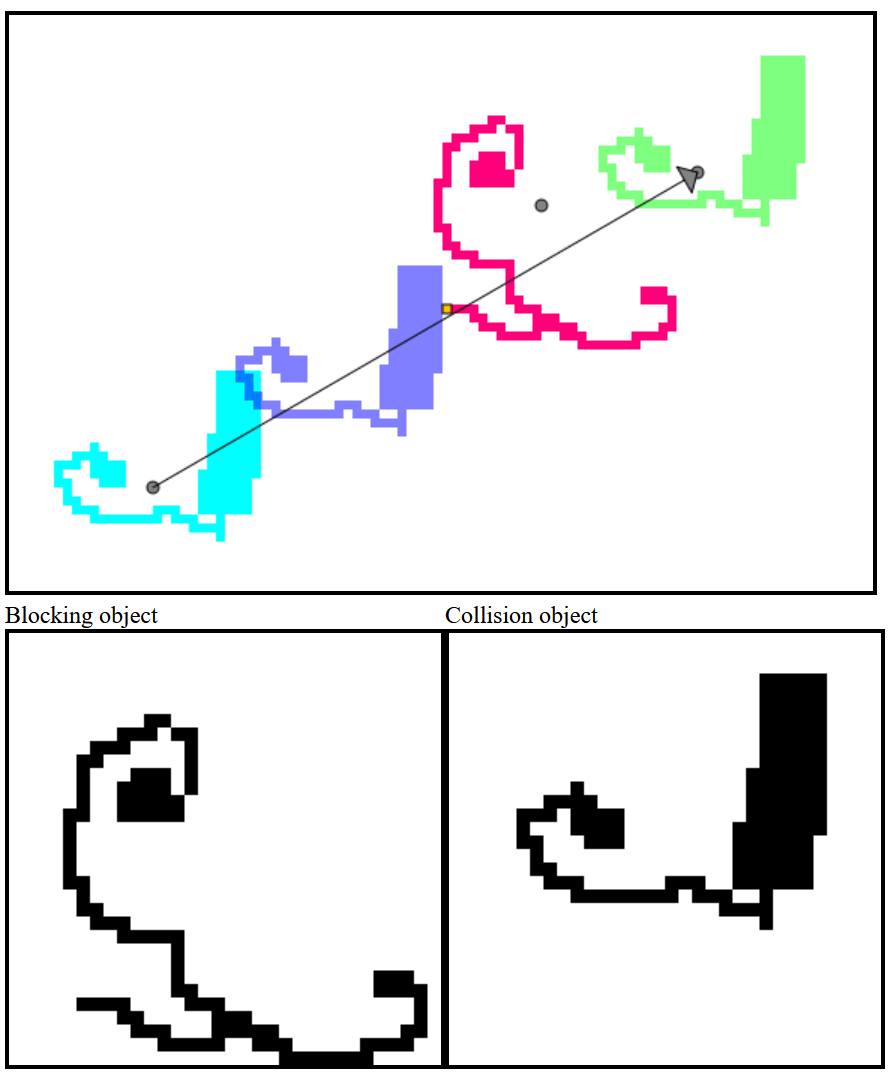
The result looks like this:
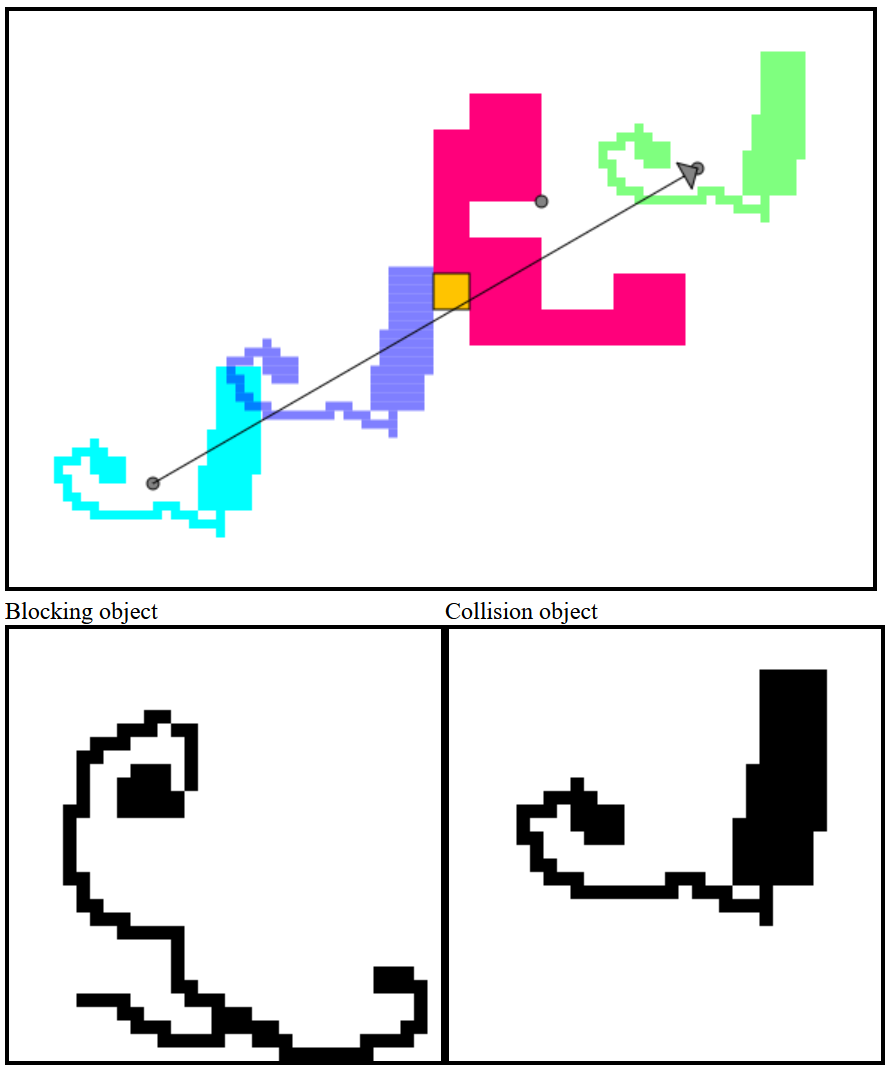
By setting the maxlevel parameters, we can also block with the coarser version!
And with this we are finished! We implemented exact collision of arbitrary pixel maps with each other that also allow interaction with general AABBs. For example, you could place a box at the center of your player character's feet. When moving, you can check for collisions with the surroundings. You could also combine this with my last post on generating normals from pixel grids to handle interaction with the surroundings.
If you only want to move in pixel units you can just round the values you get from the above algorithm. You could also compute the amount of offset needed based on the movement direction to get a more correct result.
There are of course various other ways to improve this. The literature about spatial data structures is large and there are many ways to optimize the tree traversal, especially with directional rays. For example, some schemes in raytracing will sort (without a real sorting algorithm) child nodes based on which one is closer. Even in our collision algorithm, there should be some heuristic to discard a node, if any collision inside is guaranteed to be behind the current one.
If you also want to integrate rotation into this (without rotation during the movement), you can just replace all the AABB methods with their corresponding OBB variants. A resource on how to implement that can be found here. This source is for 3D and also contains some more advanced math and functionality, like estimating general movement during the timestep, but for the basic OBB tests, you can more or less copy the code, but you might need to adjust some things. As 3D rotation is more complex, the 2D version will be a lot simpler. You can probably also find these functions ready-mad for 2D somewhere.
Thanks for reading!